Global Proxy with PPTP, Redsocks, iptables, and HTTPS/SOCKS5 Proxy
Original posts:
https://groups.google.com/g/go-gost/c/dzDQeTfNCjY
https://docs.google.com/document/d/1OGIrebKWq__Lt0ADxprxapevC1BEzPaR6ry9XY_WDdA
Use Case
When using a proxy to access the internet, you typically need to configure each application individually (if it supports proxies). It's difficult to make all network traffic go through the proxy by default. On mobile devices (especially iPhones), without a VPN, it's hard to achieve global proxy functionality using only HTTPS or SOCKS5 proxies.
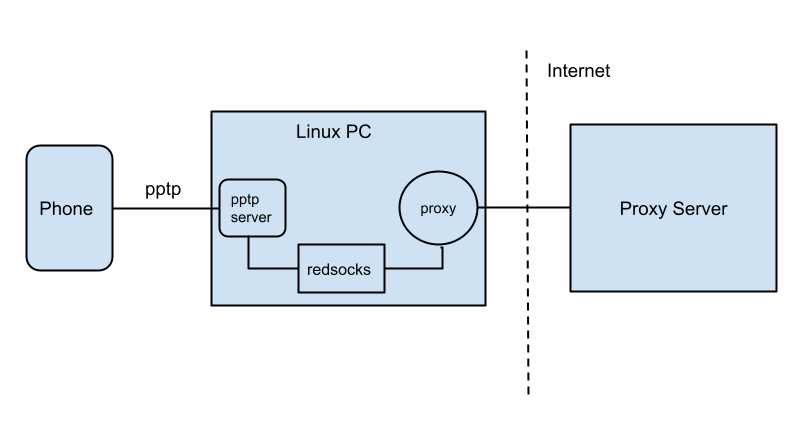
Here, the Linux PC uses Ubuntu 14.04, the VPN uses PPTP, and the proxy uses SOCKS5.
PPTP Server Installation & Configuration
Install the PPTP server:
After installation, configure it.
Edit /etc/pptpd.conf, add these two lines:
localip is the PPTP server IP, remoteip is the IP range assigned to clients.
Edit /etc/ppp/chap-secrets to set PPTP authentication, add a new line at the end:
Here vpn is the username, pptpd is the VPN type (can be set to *), 123456 is the password, and * allows connections from any IP.
Edit /etc/ppp/pptpd-options to add DNS servers:
Finally, restart the PPTP server:
Verify the service is running:
Linux System Configuration
Edit /etc/sysctl.conf, add:
Apply changes:
Redsocks Installation & Configuration
Redsocks works with iptables to redirect TCP connections.
Project info: http://darkk.net.ru/redsocks/ Source: https://github.com/darkk/redsocks
Build redsocks
Create a config file redsocks.conf:
base {
    log_debug = on;
    log_info = on;
    log = "file:/tmp/reddi.log";
    daemon = on;
    redirector = iptables;
}

redsocks {
    local_ip = 0.0.0.0;
    local_port = 31338;
    ip = 127.0.0.1;
    port = 8899;
    type = socks5;
}
Run redsocks:
iptables Configuration
Create ipt.conf:
*filter
:INPUT ACCEPT
:FORWARD ACCEPT
:OUTPUT ACCEPT
COMMIT

*nat
:PREROUTING ACCEPT
:INPUT ACCEPT
:OUTPUT ACCEPT
:POSTROUTING ACCEPT
:REDSOCKS -

-A PREROUTING -i ppp+ -p tcp -j REDIRECT --to 31338
-A REDSOCKS -d 0.0.0.0/8 -j RETURN
-A REDSOCKS -d 10.0.0.0/8 -j RETURN
-A REDSOCKS -d 127.0.0.0/8 -j RETURN
-A REDSOCKS -d 169.254.0.0/16 -j RETURN
-A REDSOCKS -d 172.24.0.0/16 -j RETURN
-A REDSOCKS -d 192.168.0.0/16 -j RETURN
-A REDSOCKS -d 224.0.0.0/4 -j RETURN
-A REDSOCKS -d 240.0.0.0/4 -j RETURN
-A REDSOCKS -p tcp -j REDIRECT --to 31338
-A OUTPUT -p tcp -j REDSOCKS

-A POSTROUTING -s 192.168.0.0/24 -o eth0 -j MASQUERADE
COMMIT
Apply iptables rules:
Proxy Configuration
Any standard HTTPS or SOCKS5 proxy (e.g., Shadowsocks, GOST) can be used. The client's listening address should match the ip and port in the redsocks configuration.
Done!